Kafka Architecture Explained: Brokers, Partitions, KRaft
Kafka architecture with a diagram: brokers, topics, partitions, replicas and ISR, the KRaft controller, producers and consumer groups, tested on Kafka 4.4.
On this page · 12 sections
- The Kafka architecture diagram
- Brokers and the cluster
- Topics, partitions and offsets
- Replication: leaders, followers and the ISR
- The controller and KRaft
- Producers: the write path
- Consumers and consumer groups: the read path
- What happens when a broker fails
- Design decisions that make Kafka fast
- Sizing rules of thumb
- Frequently asked questions
- Keep learning
Kafka’s architecture is small once you see it: a cluster of brokers stores topics, each topic is split into partitions, every partition is copied to a few brokers, and a controller quorum keeps track of who leads what. Producers append to partition leaders; consumers read from them in consumer groups. Everything else (ordering, scaling, failover, delivery guarantees) follows from those few pieces.
This guide walks through each component with a diagram, then runs a real three-node Kafka 4.4 cluster and stops one broker to show what actually happens. Every command output below is copied from that run.
The Kafka architecture diagram
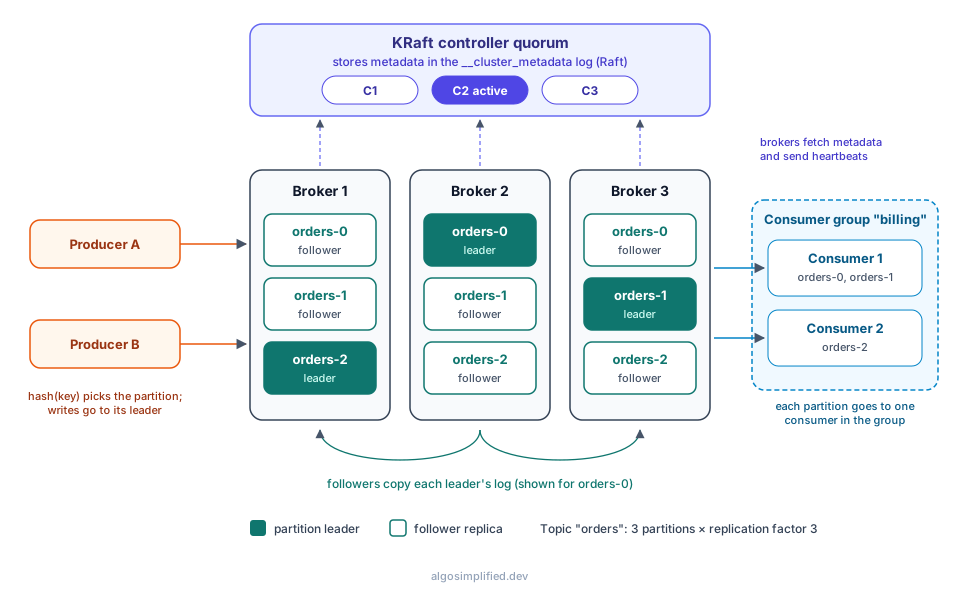
Read it from left to right:
- Producers decide which partition each record goes to (by hashing the key) and send it to that partition’s leader.
- Brokers store partitions as append-only logs on disk. Each partition has one leader and some followers that copy it.
- The controller quorum (top) stores the cluster’s metadata (which brokers are alive, which replica leads each partition) and tells brokers about changes.
- Consumers in a group split the partitions between them and read each one in order, tracking their position with offsets.
Brokers and the cluster
A broker is one Kafka server process. A cluster is a set of brokers that share the same metadata. Brokers do the heavy lifting:
- accept writes from producers and append them to partition logs on disk,
- serve reads to consumers and to follower replicas on other brokers,
- report to the controller and apply the metadata it publishes.
Clients only need one or two broker addresses (bootstrap.servers). They fetch the full cluster metadata from there and then talk directly to whichever broker leads each partition they need. There is no central proxy in the data path, which is a big part of why Kafka scales.
Topics, partitions and offsets
A topic is a named stream of records, like orders or payments. A topic is split into partitions, and each partition is an ordered, append-only log. Each record in a partition gets a sequential offset: 0, 1, 2 and so on.
Two consequences matter in practice:
- Ordering is per partition, not per topic. Records with the same key land in the same partition, so all events for one key stay in order. There is no global order across partitions.
- Partitions are the unit of parallelism. One partition is read by at most one consumer in a group, so a topic with 6 partitions can keep at most 6 consumers in one group busy.
Here is that rule on the test cluster: seven records with four different keys, written to a 3-partition topic.
$ printf 'alice:p1\nbob:p2\ncarol:p3\ndave:p4\nalice:p5\nbob:p6\nalice:p7\n' | \
    kafka-console-producer.sh --bootstrap-server localhost:9092 --topic payments \
      --reader-property parse.key=true --reader-property key.separator=:

$ kafka-console-consumer.sh --bootstrap-server localhost:9092 --topic payments \
    --from-beginning --group billing \
    --formatter-property print.partition=true --formatter-property print.offset=true \
    --formatter-property print.key=true
Partition:0 Offset:0 alice p1
Partition:0 Offset:1 bob p2
Partition:0 Offset:2 alice p5
Partition:0 Offset:3 bob p6
Partition:0 Offset:4 alice p7
Partition:1 Offset:0 dave p4
Partition:2 Offset:0 carol p3Every alice record went to partition 0, in the order it was sent; offsets restart at 0 in each partition. Notice too that alice and bob share a partition: hashing spreads keys, but it doesn’t guarantee an even spread with only a few keys. Records without a key are spread by the producer’s sticky partitioner, which fills a batch for one partition before moving to the next.
On disk, each partition is a directory of segment files plus offset and time indexes. Old segments are deleted by retention (time or size) or compacted to keep only the latest value per key. The Kafka storage lesson covers segments, retention and compaction in depth.
Replication: leaders, followers and the ISR
Each partition is stored on replication.factor brokers. One replica is the leader: all writes go to it, and by default all reads too. The others are followers that continuously fetch from the leader to stay up to date.
The in-sync replicas (ISR) are the replicas that are caught up with the leader (a follower that falls behind for longer than replica.lag.time.max.ms, 30 seconds by default, drops out). Only an in-sync replica can be elected leader without losing acknowledged data.
This is the orders topic on the test cluster, created with 3 partitions and replication factor 3:
$ kafka-topics.sh --bootstrap-server localhost:9092 --describe --topic ordersTopic: orders TopicId: 4B3TSKlDRtCdKi47DG0fwg PartitionCount: 3 ReplicationFactor: 3 Configs: min.insync.replicas=2
Topic: orders Partition: 0 Leader: 2 Replicas: 2,3,1 Isr: 2,3,1 Elr: LastKnownElr:
Topic: orders Partition: 1 Leader: 3 Replicas: 3,1,2 Isr: 3,1,2 Elr: LastKnownElr:
Topic: orders Partition: 2 Leader: 1 Replicas: 1,2,3 Isr: 1,2,3 Elr: LastKnownElr: How to read it:
- Leader: the broker that currently serves partition 0 is broker 2.
- Replicas: the brokers holding copies. The first one listed is the preferred leader. Kafka spreads leadership so each broker leads about one partition here.
- Isr: all three replicas are in sync.
- Elr / LastKnownElr: eligible leader replicas, a newer safety feature (KIP-966). When the ISR shrinks below
min.insync.replicas, Kafka remembers which replicas still have all committed data so it can pick a safe leader later. Empty here because nothing has failed.
acks and min.insync.replicas
The producer’s acks setting decides when a write counts as successful:
acks | The leader replies when… | Risk |
|---|---|---|
0 | never; the producer doesn’t wait | Records can vanish silently |
1 | the leader has written it | Lost if the leader dies before followers copy it |
all (-1) | every replica in the ISR has it | Safe, as long as the ISR is big enough |
acks=all on its own isn’t enough: if the ISR shrinks to just the leader, “all in-sync replicas” means one copy. That’s what min.insync.replicas is for. With replication factor 3 and min.insync.replicas=2, an acks=all write needs at least two copies, so the topic keeps accepting writes with one broker down and rejects them (with NotEnoughReplicas) if two are down, rather than pretending they’re durable. Since Kafka 3.0, producers default to acks=all with idempotence on, which also prevents duplicates from retries.
The controller and KRaft
Something has to decide which replica leads each partition, notice when a broker dies, and keep the topic list. That’s the controller.
Older Kafka used ZooKeeper for this. Since Kafka 4.0, ZooKeeper is gone entirely and every cluster runs in KRaft mode: a small group of controller nodes (usually 3, or 5 for very large clusters) runs the Raft consensus protocol over an internal log called __cluster_metadata. One controller is active; the others are hot standbys with a full copy of the metadata. Brokers fetch the metadata log from the controllers and send them heartbeats.
$ kafka-metadata-quorum.sh --bootstrap-server localhost:9092 describe --statusClusterId: hzBgkkuDRbyx9OM67laWUA
LeaderId: 2
LeaderEpoch: 1
HighWatermark: 142
MaxFollowerLag: 0
MaxFollowerLagTimeMs: 176
CurrentVoters: [{"id": 1, "endpoints": ["CONTROLLER://localhost:19091"]}, {"id": 2, "endpoints": ["CONTROLLER://localhost:19092"]}, {"id": 3, "endpoints": ["CONTROLLER://localhost:19093"]}]
CurrentObservers: []LeaderId: 2 is the active controller. Raft needs a majority of voters, so 3 controllers tolerate 1 failure and 5 tolerate 2.
Why the switch mattered: metadata now lives in Kafka’s own replicated log, so there’s one system to run and secure, controller failover takes moments instead of reloading all state from ZooKeeper, and clusters can hold far more partitions.
In production, controllers usually run as separate processes (process.roles=controller) from brokers (process.roles=broker). The test cluster used combined mode, where each node is both, which is fine for development:
process.roles=broker,controller
node.id=1
controller.quorum.voters=1@localhost:19091,2@localhost:19092,3@localhost:19093
listeners=PLAINTEXT://localhost:9091,CONTROLLER://localhost:19091
advertised.listeners=PLAINTEXT://localhost:9091
controller.listener.names=CONTROLLER
inter.broker.listener.name=PLAINTEXT
listener.security.protocol.map=CONTROLLER:PLAINTEXT,PLAINTEXT:PLAINTEXT
log.dirs=/tmp/kc/n1
num.partitions=3
default.replication.factor=3
min.insync.replicas=2
offsets.topic.replication.factor=3
transaction.state.log.replication.factor=3
transaction.state.log.min.isr=2
Nodes 2 and 3 are the same file with their own node.id, ports and log.dirs. Each node’s storage is formatted once with a shared cluster ID (kafka-storage.sh random-uuid, then kafka-storage.sh format -t <id> -c node1.properties) before the first start.
Producers: the write path
When your code calls send():
- The record is serialized and assigned a partition: by key hash if it has a key, by the sticky partitioner if not, or explicitly if you set one.
- It’s added to an in-memory batch for that partition. Batches are sent when they’re full (
batch.size) or afterlinger.ms, and can be compressed. - The batch goes to the partition leader, which appends it to its log.
- Followers fetch the new records. Once every ISR member has them, the records are committed (below the high watermark) and the leader replies to an
acks=allproducer.
Consumers can only read committed records, which is why a record acknowledged with acks=all survives a leader failure. The producers lesson covers batching, idempotence and transactions.
Consumers and consumer groups: the read path
Consumers pull: they ask a broker for records from a partition starting at an offset. Kafka doesn’t delete records when they’re read, so many independent applications can read the same topic, each at its own pace.
A consumer group is a set of consumers sharing a group.id. Kafka assigns each partition to exactly one member, so the group processes the topic in parallel while each partition stays in order. If a consumer joins or dies, partitions are reassigned (a rebalance). The group coordinator, a broker, manages membership and stores each group’s committed offsets in the internal __consumer_offsets topic:
$ kafka-consumer-groups.sh --bootstrap-server localhost:9092 --describe --group billingConsumer group 'billing' has no active members.
GROUP TOPIC PARTITION CURRENT-OFFSET LOG-END-OFFSET LAG CONSUMER-ID HOST CLIENT-ID
billing orders 0 0 0 0 - - -
billing orders 1 0 0 0 - - -
billing orders 2 6 6 0 - - -CURRENT-OFFSET is where the group will resume, LOG-END-OFFSET is the newest record, and LAG is the difference: how far behind the group is. Lag is the single most useful Kafka health metric.
Kafka 4.0 also made the new consumer rebalance protocol (KIP-848) generally available. Clients opt in with group.protocol=consumer, and the broker then computes assignments incrementally, so a rebalance no longer pauses the whole group. The consumer groups lesson and the rebalancing lesson go deeper.
What happens when a broker fails
The best way to understand the architecture is to break it. On the test cluster, broker 2 was both the leader of orders-0 and the active controller. Here’s the topic about 15 seconds after stopping it:
Topic: orders	TopicId: 4B3TSKlDRtCdKi47DG0fwg	PartitionCount: 3	ReplicationFactor: 3	Configs: min.insync.replicas=2
	Topic: orders	Partition: 0	Leader: 3	Replicas: 2,3,1	Isr: 3,1	Elr: 	LastKnownElr:
	Topic: orders	Partition: 1	Leader: 3	Replicas: 3,1,2	Isr: 3,1	Elr: 	LastKnownElr:
	Topic: orders	Partition: 2	Leader: 1	Replicas: 1,2,3	Isr: 1,3	Elr: 	LastKnownElr:
$ kafka-metadata-quorum.sh --bootstrap-server localhost:9091 describe --status | grep Leader
LeaderId: 1
LeaderEpoch: 2Three things happened automatically:
- Controller failover. The two remaining controllers elected node 1 as the new active controller (epoch 1 → 2).
- Partition leader election. The new controller noticed broker 2 had stopped heartbeating and made broker 3, the next in-sync replica, leader of
orders-0. - ISR shrink. Broker 2 was removed from every ISR.
Writes kept working: an acks=all produce succeeded because two in-sync replicas still met min.insync.replicas=2. Clients found the new leader on their own by refreshing metadata.
After restarting broker 2, it caught up from the leaders and rejoined every ISR within about 20 seconds:
	Topic: orders	Partition: 0	Leader: 3	Replicas: 2,3,1	Isr: 1,2,3	Elr: 	LastKnownElr:
	Topic: orders	Partition: 1	Leader: 3	Replicas: 3,1,2	Isr: 1,2,3	Elr: 	LastKnownElr:
	Topic: orders	Partition: 2	Leader: 1	Replicas: 1,2,3	Isr: 1,2,3	Elr: 	LastKnownElr:
Broker 3 still leads partition 0 for now. Kafka moves leadership back to the preferred replica (broker 2) on its own a few minutes later (auto.leader.rebalance.enable, checked every 5 minutes by default), so load evens out again. On the test cluster, a later --describe showed Partition: 0 Leader: 2 again.
Design decisions that make Kafka fast
- Sequential disk I/O. Appending to a log and reading it in order is fast even on spinning disks, and it lets the OS page cache do most of the work.
- Batching and compression on the producer, end to end: brokers store batches as they arrive and send them to consumers without unpacking them.
- Zero-copy reads. For plaintext connections, brokers can send file data straight from the page cache to the network socket.
- Pull-based consumers control their own pace, so a slow consumer doesn’t slow down the broker or other consumers.
- Partitioning spreads load over brokers and consumers with no coordination between partitions.
Sizing rules of thumb
| Setting | Common starting point | Why |
|---|---|---|
| Brokers | 3 or more | Replication factor 3 needs 3 brokers |
| Controllers | 3 (5 for very large clusters) | Raft majority: survives 1 (or 2) failures |
replication.factor | 3 | Survives one broker loss with writes still allowed |
min.insync.replicas | 2 | With acks=all, never acknowledge a single copy |
| Partitions per topic | Enough for peak consumer parallelism, with headroom | You can add partitions later, but key-to-partition mapping changes when you do |
Frequently asked questions
What are the main components of Kafka architecture?
Brokers (store and serve data), topics and partitions (how data is organized), replicas with leaders and followers (durability), the KRaft controller quorum (metadata and leader election), producers (write) and consumers in consumer groups (read).
Does Kafka still need ZooKeeper?
No. Kafka 4.0 removed ZooKeeper support; clusters use the built-in KRaft controller quorum. Clusters on older versions must migrate to KRaft on a 3.x release before upgrading to 4.x.
Does Kafka guarantee message order?
Within a partition, yes. Across partitions, no. Give related events the same key (for example a user or order ID) so they go to the same partition.
How many partitions should a topic have?
At least as many as the number of consumers you want working in parallel at peak, plus headroom. More partitions also mean more files, more leader elections on failure and more memory, so don’t over-partition small topics. Kafka partitions explained works through the sizing maths and what adding partitions does to keyed data.
What’s the difference between a broker and a controller?
Brokers hold partition data and serve clients. Controllers hold cluster metadata and make decisions like leader elections. A node can be either, or both in combined mode.
Keep learning
- The free Kafka Mastery course, starting with Kafka fundamentals and architecture.
- Kafka tutorial for beginners if you want the basics with less depth.
- Kafka partitions explained: key hashing, ordering, and how many partitions to create.
- Kafka interview questions: 35 questions with answers to test yourself.
- Kafka vs RabbitMQ for when a queue is the better fit.
- Kafka in production and Kafka monitoring for running it for real.
- The System Design course, where Kafka appears as the event backbone in several designs.